
Your Notion page can sync perfectly while an embedded widget shows different data on your laptop and phone. The page stores the widget's URL. Many third-party widgets store ticks, notes, dates or progress in the browser that opened that URL.
A different browser or device gets a fresh local copy. Notion cannot sync data it never receives.
The embed and its data live in different places
Notion saves the page, blocks and embed address to your workspace. The embedded site decides where its own information goes. Some providers attach widget data to an account. Others keep it in browser storage because that is quick, private and does not require a login.
Browser-local storage belongs to a particular site inside a particular browser profile. Chrome on a laptop and Safari on a phone do not share it. A work profile and personal profile on the same computer can also hold separate copies.
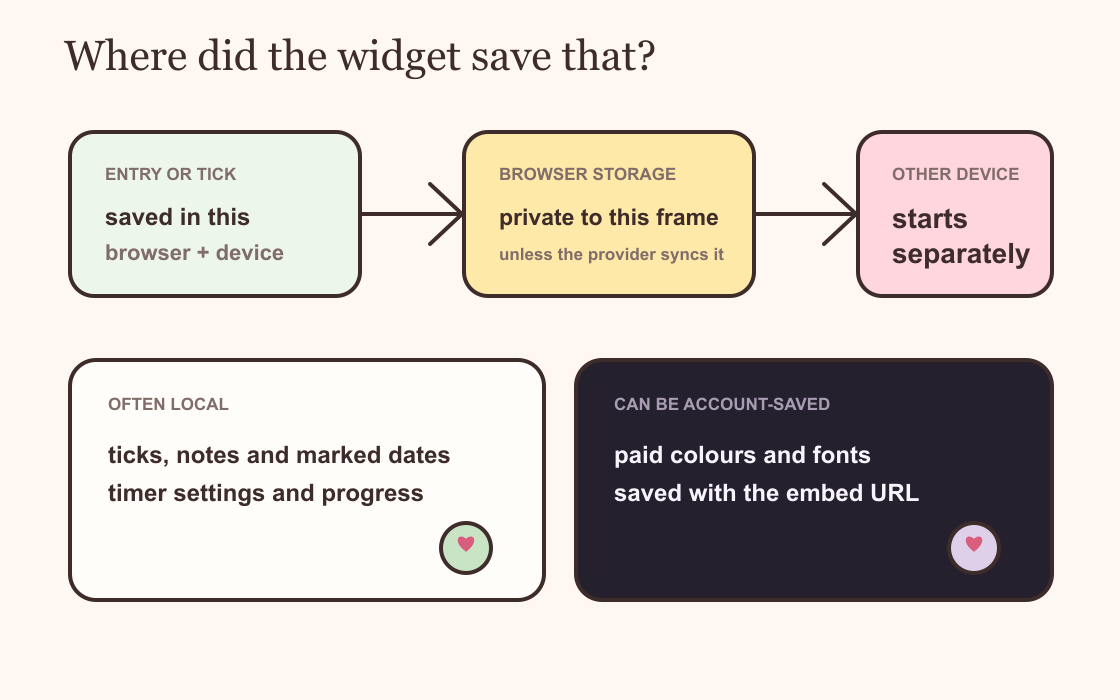
Signs that the widget is using local storage
The strongest sign is a widget that remembers your entry in one browser and appears empty elsewhere. It may also reset after you clear website data, use a private window or replace the embed with a newly generated link.
Try opening the widget's exact URL in the browser where it normally works. If the data appears there, the widget is healthy and its local copy still exists. If the same URL is empty in another browser, you have found a storage boundary rather than a Notion sync failure.
Do not keep refreshing or replacing the working embed while you test. That can make it harder to tell which copy contains the information you want.
Saved colours do not prove that entries sync
A provider may save a widget's visual configuration online while leaving its interactive entries on the device. The background, font and accent can therefore match everywhere even when a checklist or marked calendar does not.
Dearly Peculiar separates those jobs. A saved look controls the colours and type used by the embed. Interactive state, such as habit ticks or marked dates, is stored locally by widgets that remember input. It keeps what you type on your own device, but local entries do not travel with your Notion workspace.
Keep the full embed link. A widget instance can use an identifier in that URL to keep its state separate from another copy of the same widget.
What you can recover
If the original browser still shows the data, copy important notes or totals out before changing anything. Keep using that browser for the history, or recreate the current state manually on the new device.
If website data was cleared and the provider has no account backup, the browser copy is usually gone. Re-embedding the same URL does not rebuild deleted local storage. Private browsing is especially unreliable for anything you expect to keep.
For information that matters across devices, put the source record in a Notion database or choose a widget provider that states it offers account-based syncing. Use the widget as a view or prompt, not the only copy of a deadline, savings total or long note.
Before you move to a new device
Take a screenshot of the working widget and copy any important text into Notion. Save the original embed URL somewhere you can find it. Then set up the new device while the old one is still available, so you can compare the two instead of relying on memory.
Test one entry before transferring the rest. If it stays after a reload on the new browser, that copy can now keep its own local history. The old history will not merge into it unless the widget offers a separate export, import or account sync feature.
A browser profile also counts as a separate place. Switching from a personal Chrome profile to a work profile on the same laptop can look exactly like moving computers. Check the profile name before assuming the data has vanished.
A quick device test
Add one harmless entry on the laptop. Reload the page there. Open the same Notion page on the phone. Then open the widget URL directly on both devices.
If only the first browser remembers the entry, local storage is working as designed. If neither remembers it, check the general widget troubleshooting guide. The provider may be blocking storage, the browser may be clearing it or the widget may have a fault.